Write once
The same harness class drives jsdom unit tests and real-browser end-to-end tests.
Test harnesses for components and pages
Like page objects, but for components too. One harness API for Testing Library, node:test, Bun, Playwright, Cypress, WebdriverIO, Nightwatch, Vitest browser mode, Puppeteer, TestCafe, Ember and Angular, over React, Vue, Solid and Svelte alike, with Gherkin on top and Storybook play functions beside. The same class drives a fast jsdom unit test, a story, and a real-browser end-to-end test.
npm i -D @harnessed-ts/core @harnessed-ts/dom
Then add the driver package for your runner.
* Well, every one with a solid border below. The dashed ones haven't been through the conformance suite yet. Bring snacks.
Why harnessed
The same harness class drives jsdom unit tests and real-browser end-to-end tests.
Testing Library, node:test, Bun, Playwright, Cypress, WebdriverIO, Nightwatch, Vitest, Puppeteer, TestCafe, Ember and Angular, plus Storybook play functions.
Ambiguous matches fail loudly, and absence answers immediately, under every driver.
Harnesses query the DOM, not React, Ember, Vue, Solid, Svelte or Angular.
Concepts
A class that drives a component the way a person would, through methods named for what the component does. Tests state intent; the harness owns the DOM wiring.
@Harness({ host: testId('login-form') })
class LoginFormHarness extends ComponentHarness {
  @ByLabel('Email') private accessor email!: Query
  @ByLabel('Password') private accessor password!: Query
  @ByRole('button', { name: /sign in/i }) private accessor submit!: Query
  @ByTestId('login-error') private accessor errorLine!: Query

  async signInAs(email: string, password: string): Promise<void> {
    await this.email.fill(email)
    await this.password.fill(password)
    await this.submit.click()
  }

  async error(): Promise<string | null> {
    if (await this.errorLine.isAbsent()) return null
    return this.errorLine.text()
  }
}render(<LoginForm />)
const form = new LoginFormHarness(dom({ user: userEvent.setup() }))
await form.signInAs('ada@example.com', 'hunter2')
expect(await form.error()).toBeNull()const form = new LoginFormHarness(pw(page))
await form.signInAs('ada@example.com', 'hunter2')
await expect(form).toBeAbsent()Mocking
@harnessed-ts/mock describes the backend a test needs, and each driver
intercepts requests its own way — page.route under Playwright,
cy.intercept under Cypress, fetch and XHR patched in the page
under Testing Library, Ember and Storybook. The same handlers, held to the same
conformance catalog, under every runner.
@Api({ base: '/api/users' })
class UsersApi extends ApiHarness {
  @Get('/:id')
  byId({ params }: MockRequest<{ id: string }>) {
    return params.id === '1' ? json({ name: 'Ada' }) : notFound()
  }
}const api = mock(dom({ user }), { scope: '/api/**' })
await api.use(UsersApi)
render(<Profile id="1" />)
expect(await profile.name()).toBe('Ada')const api = mock(pw(page), { scope: '/api/**' })
await api.use(UsersApi, { byId: () => serverError() })
await profile.goto()
expect(await profile.error()).toBe('500')In action
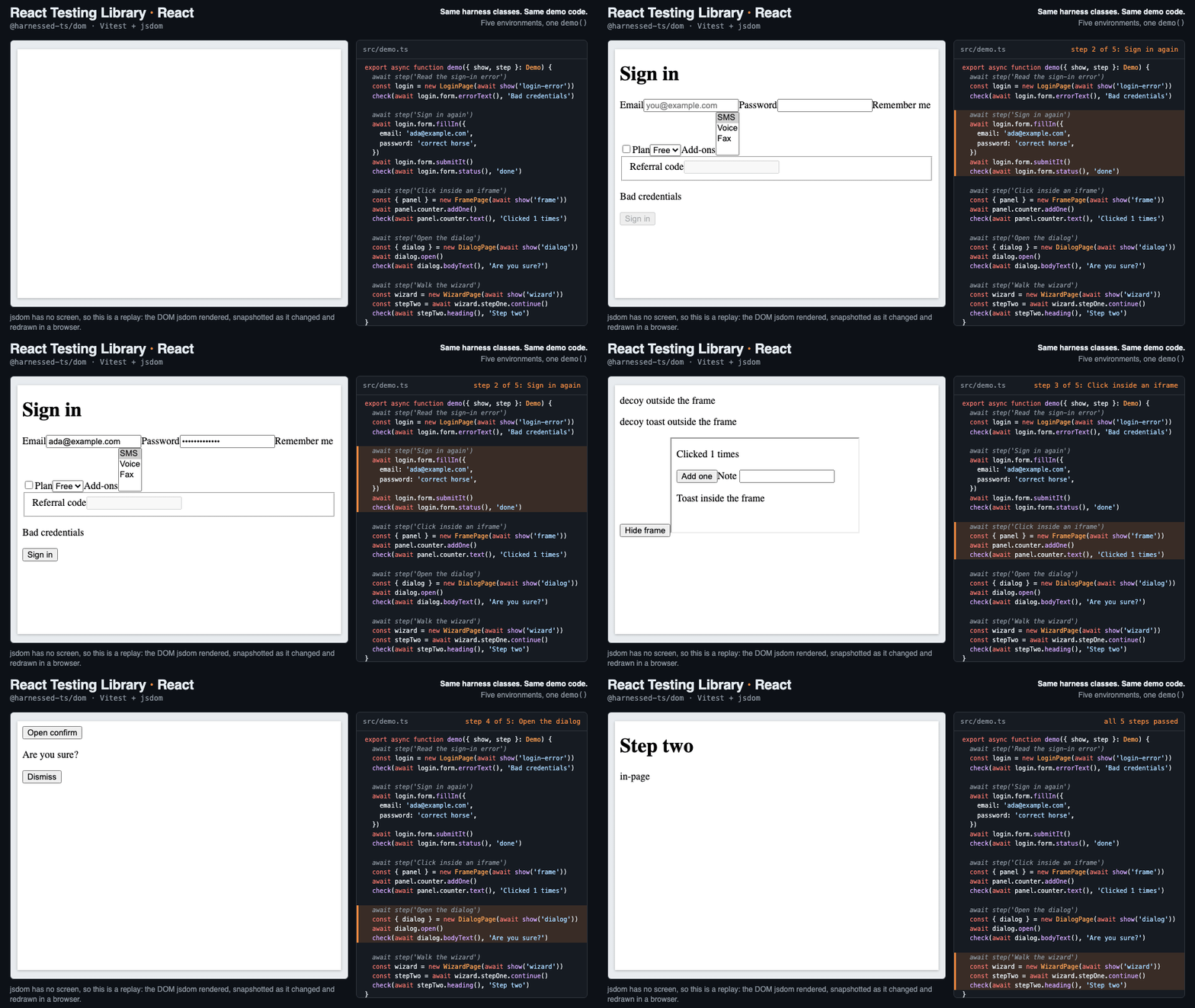
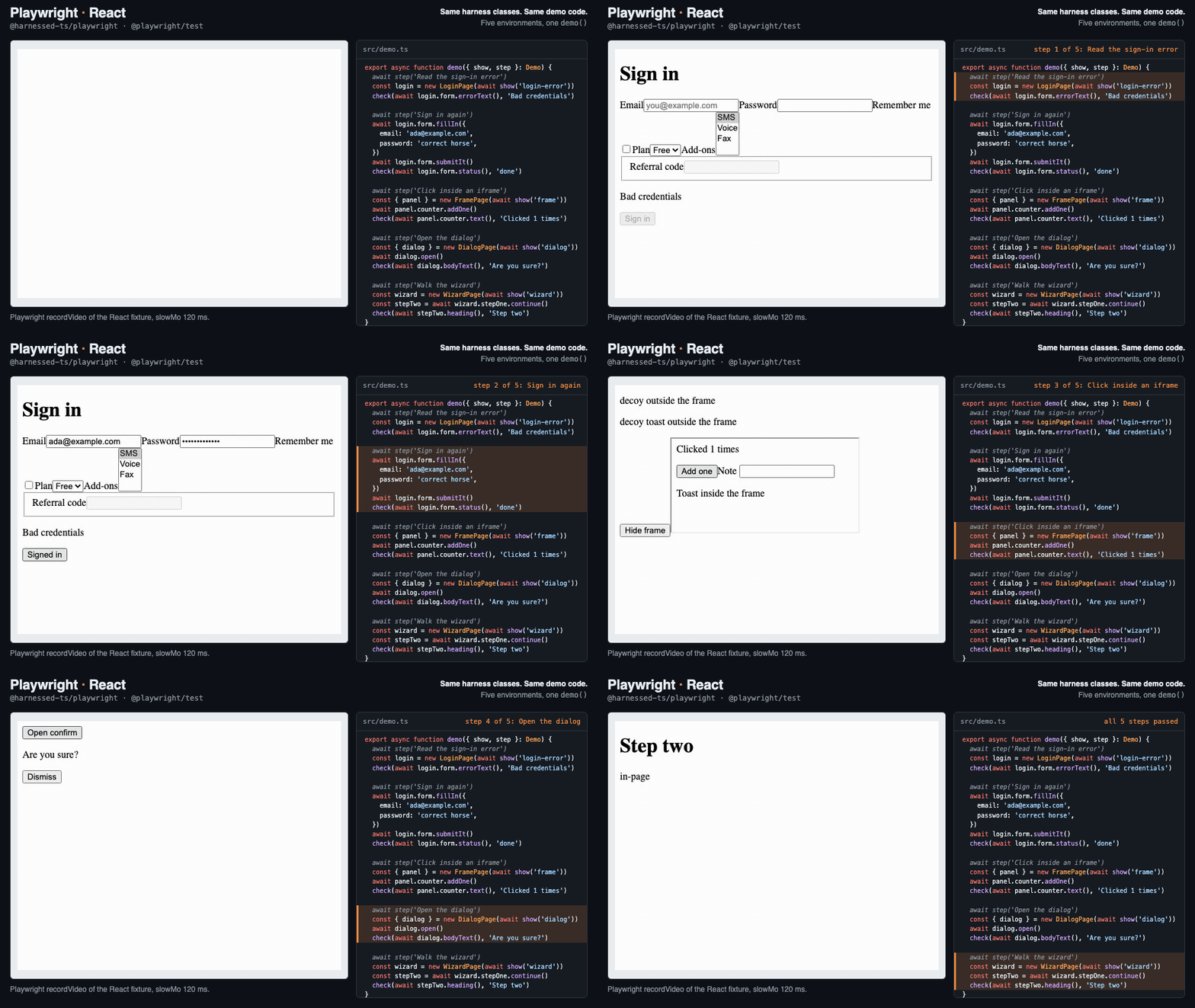
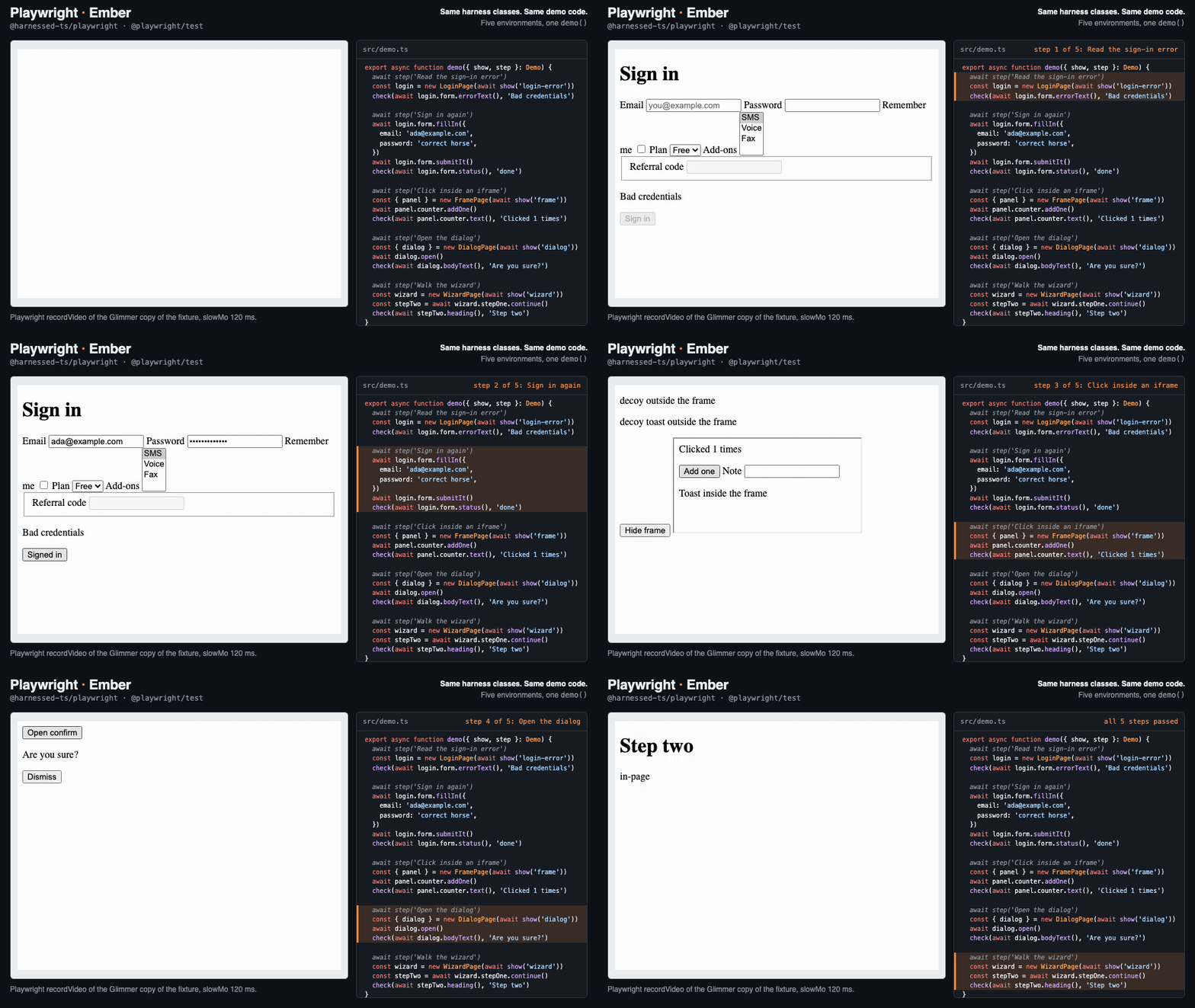
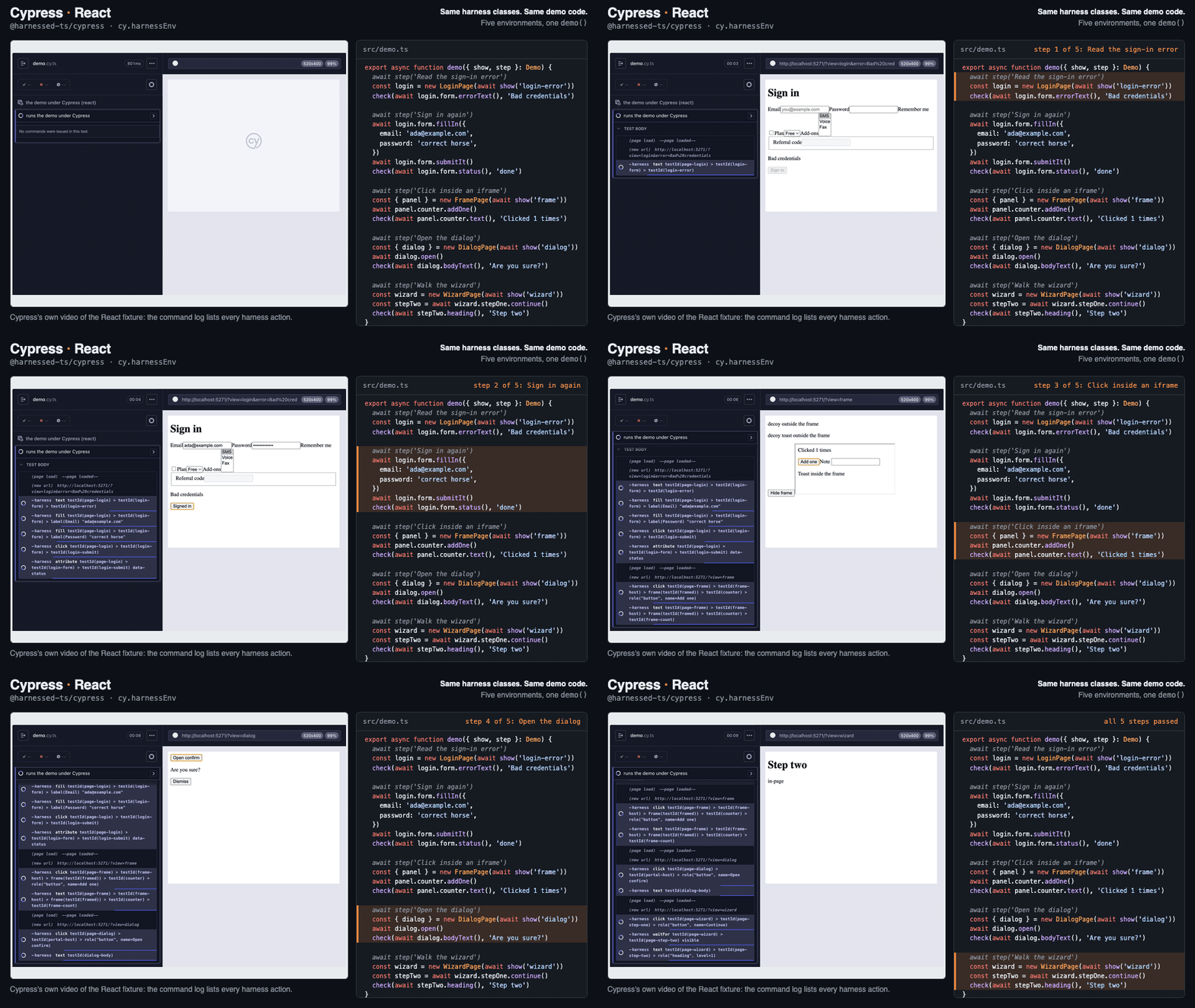
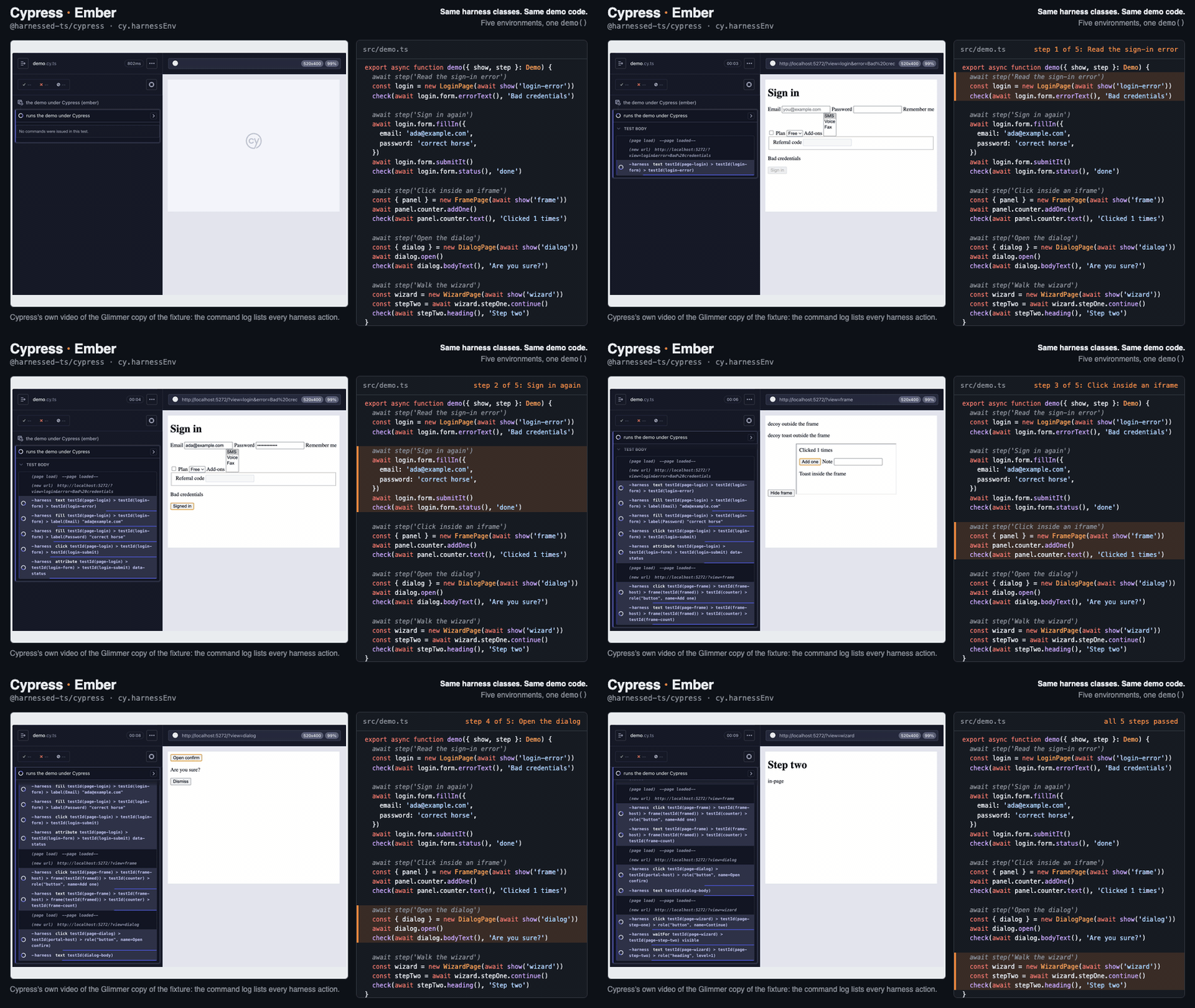
The same demo() function and harness classes, recorded under each runner
against a React app and its Ember port. CI runs this demo on every pull request.
Playground
A harness and its Vitest spec running in jsdom, in your browser on StackBlitz. Edit the test or the form and watch it rerun. Browser runners need a real browser binary, which StackBlitz can't launch, so they're shown as code below.
Compatibility
Every package is @harnessed-ts/<name>. Each runner passes the same
conformance catalog on every pull request.
Read the runner guides →
| Runner | Package | Environment | Mocking | Conformance |
|---|---|---|---|---|
| Testing Library | dom |
jsdom; React, Vue, Solid, Svelte | In the page |


|
| node:test | dom |
jsdom | In the page (not in CI) |

|
| Bun test | dom |
happy-dom | In the page (not in CI) |

|
| Playwright | playwright |
Real browser | page.route |


|
| Ember (QUnit, exam, Vitest) | ember |
Real browser | In the page |


|
| Angular (Vitest, Vitest browser) | angular |
jsdom or real browser | Not yet |


|
| Cypress (e2e and component) | cypress |
Real browser | cy.mock |


|
| WebdriverIO | webdriverio |
Real browser (BiDi, Classic) | WebDriver BiDi |

|
| Vitest browser mode | vitest-browser |
Real browser | In the page |

|
| Nightwatch (e2e and component) | nightwatch |
Real browser (Nightwatch and Mocha runners) | Not yet |


|
| Puppeteer | puppeteer |
Real browser | Request interception |

|
| TestCafe | testcafe |
Real browser | Request hook; no sockets |

|
| Storybook (React and Ember) | storybook |
Play functions; stories as fixtures | Per story, in parameters |


|
| Gherkin (playwright-bdd, cucumber-js, Cypress cucumber, Nightwatch) | gherkin |
Real browser | world.mocks (not Nightwatch) |


|
Every runner needs @harnessed-ts/core and standard decorators; see
required setup.
npm i -D @harnessed-ts/core @harnessed-ts/dom @testing-library/dom @testing-library/user-eventimport { dom } from '@harnessed-ts/dom'
import '@harnessed-ts/dom/matchers' // toBeAbsent, toBeSelected, toReadAs
import userEvent from '@testing-library/user-event'
const { baseElement } = render(<LoginForm />)
const form = new LoginFormHarness(dom({ user: userEvent.setup(), container: baseElement }))
await form.signInAs('ada@example.com', 'hunter2')
expect(await form.error()).toBeNull()Mocking the API:
import { mock } from '@harnessed-ts/dom/mock' // with @mswjs/interceptors installed
await mock(dom({ user })).use(UsersApi)npm i -D @harnessed-ts/core @harnessed-ts/dom @harnessed-ts/chai chai esbuild jsdom global-jsdom
node --test --import global-jsdom/register --import @harnessed-ts/core/register "tests/**/*.test.tsx"import { harnessedChai } from '@harnessed-ts/chai'
import * as chai from 'chai'
import { afterEach, it } from 'node:test'
chai.use(harnessedChai)
afterEach(cleanup)
it('signs in', async () => {
const { baseElement } = render(<LoginForm />)
const form = new LoginFormHarness(dom({ user: userEvent.setup(), container: baseElement }))
await form.signInAs('ada@example.com', 'hunter2')
await chai.expect(form.errorBanner).to.be.absent
})bun add -d @harnessed-ts/core @harnessed-ts/dom esbuild @happy-dom/global-registrator# bunfig.toml: the DOM, then the decorator loader, then the matchers
[test]
preload = ["./happydom.ts", "@harnessed-ts/core/bun", "@harnessed-ts/dom/matchers/bun"]import { expect, it } from 'bun:test'
it('signs in', async () => {
const { baseElement } = render(<LoginForm />)
const form = new LoginFormHarness(dom({ user: userEvent.setup(), container: baseElement }))
await form.signInAs('ada@example.com', 'hunter2')
await expect(form.errorBanner).toBeAbsent()
})npm i -D @harnessed-ts/core @harnessed-ts/playwrightimport { pw } from '@harnessed-ts/playwright'
import '@harnessed-ts/playwright/matchers'
import { expect, test } from '@playwright/test'
test('checks out', async ({ page }) => {
const checkout = new CheckoutPage(pw(page))
await checkout.goto({ token: 'abc' })
const confirmation = await checkout.placeOrder()
await expect(confirmation.heading).toReadAs('Thanks!')
})Mocking the API:
import { mock } from '@harnessed-ts/playwright/mock'
await mock(pw(page)).use(UsersApi)npm i -D @harnessed-ts/core @harnessed-ts/ember @harnessed-ts/qunit
npm i -D @testing-library/dom @testing-library/user-event// tests/test-helper.ts
import { install } from '@harnessed-ts/qunit'
install(QUnit)
// a rendering test
await render(<template><LoginForm /></template>)
const form = new LoginFormHarness(ember())
await form.signInAs('ada@example.com', 'hunter2')
await assert.harness(form.error).isAbsent()
// an application test: goto() drives the router
const checkout = new CheckoutPage(ember())
await checkout.goto({ token })Mocking the API:
import { mock, setupMocks } from '@harnessed-ts/ember/mock'
setupMocks(hooks)
await mock(ember()).use(UsersApi)npm i -D @harnessed-ts/core @harnessed-ts/angular @testing-library/dom @testing-library/user-event// vite.config.ts, with @analogjs/vite-plugin-angular: harness files get standard decorators
const HARNESS_FILES = /\.(harness|page)\.ts$/
plugins: [harnessedDecorators({ include: HARNESS_FILES }), angular({ transformFilter: (_c, id) => !HARNESS_FILES.test(id) })]
// a test: every action settles at fixture.whenStable()
import { angular } from '@harnessed-ts/angular'
const { fixture } = await render(LoginForm)
const form = new LoginFormHarness(angular({ fixture }))
await form.signInAs('ada@example.com', 'hunter2')npm i -D @harnessed-ts/core @harnessed-ts/cypress @harnessed-ts/chai \
@testing-library/dom @testing-library/user-eventimport '@harnessed-ts/cypress/support'
import { harnessedChai } from '@harnessed-ts/chai'
chai.use(harnessedChai)
it('signs in', () => {
cy.visitPage(LoginPage)
cy.harness(LoginFormHarness, async form => {
await form.fillIn({ email: 'ada@example.com', password: 'hopper' })
await form.submitIt()
await expect(form).to.readAs(/Welcome/)
})
})Mocking the API:
// cypress/support/e2e.ts
import '@harnessed-ts/cypress/mock'
// in a test
cy.mock(api => api.use(UsersApi))npm i -D @harnessed-ts/core @harnessed-ts/webdriverio # WebdriverIO 10import { wdio } from '@harnessed-ts/webdriverio'
import '@harnessed-ts/webdriverio/matchers'
import { browser, expect } from '@wdio/globals'
it('signs in', async () => {
const login = new LoginPage(wdio(browser))
await login.goto()
await login.form.fillIn({ email: 'ada@example.com', password: 'hopper' })
await expect(login.form.errorQuery).toBeAbsent()
})Mocking the API:
import { mock } from '@harnessed-ts/webdriverio/mock'
await mock(wdio(browser)).use(UsersApi)npm i -D @harnessed-ts/core @harnessed-ts/vitest-browser @testing-library/dom
npm i -D @vitest/browser-playwright vitest-browser-reactimport { vitestBrowser } from '@harnessed-ts/vitest-browser'
import '@harnessed-ts/vitest-browser/matchers'
import { render } from 'vitest-browser-react'
await render(<LoginForm />)
const form = new LoginFormHarness(vitestBrowser())
await form.signInAs('ada@example.com', 'hunter2')
expect(await form.error()).toBeNull()Mocking the API:
import { mock } from '@harnessed-ts/vitest-browser/mock'
await mock(vitestBrowser()).use(UsersApi)npm i -D @harnessed-ts/core @harnessed-ts/nightwatch @harnessed-ts/chai chaiimport { nightwatch } from '@harnessed-ts/nightwatch'
it('signs in', async function () {
const login = new LoginPage(nightwatch(browser))
await login.goto() // resolved against launch_url
await login.form.signInAs('ada@example.com', 'hunter2')
await chai.expect(login.form.errorBanner).to.be.absent
})npm i -D @harnessed-ts/core @harnessed-ts/puppeteer puppeteerimport { puppeteer } from '@harnessed-ts/puppeteer'
import '@harnessed-ts/puppeteer/matchers'
import { launch } from 'puppeteer'
const page = await (await launch()).newPage()
const login = new LoginPage(puppeteer(page, { baseURL: 'http://localhost:3000' }))
await login.goto()
await login.form.fillIn({ email: 'ada@example.com' })
await expect(login.form.errorQuery).toBeAbsent()Mocking the API:
import { mock } from '@harnessed-ts/puppeteer/mock'
await mock(puppeteer(page)).use(UsersApi)npm i -D @harnessed-ts/core @harnessed-ts/testcafe testcafe typescriptimport { testcafe } from '@harnessed-ts/testcafe'
fixture('checkout').page('http://localhost:3000/cart')
test('applies a coupon', async t => {
const cart = new CartPage(testcafe(t, { baseUrl: 'http://localhost:3000' }))
await cart.coupon.apply('SAVE10')
await t.expect(await cart.total.text()).eql('$90.00')
})Mocking the API:
import { mock } from '@harnessed-ts/testcafe/mock'
await mock(testcafe(t)).use(UsersApi)npm i -D @harnessed-ts/core @harnessed-ts/storybook @testing-library/dom @testing-library/user-event// .storybook/preview.ts
import { harnessed } from '@harnessed-ts/storybook'
export default { ...harnessed() } satisfies Preview
// LoginForm.stories.tsx
const meta = {
title: 'Forms/Login Form',
component: LoginForm,
parameters: { harness: LoginFormHarness },
} satisfies Meta<typeof LoginForm>
export const WrongPassword: WithHarness<StoryObj<typeof meta>, LoginFormHarness> = {
play: async ({ harness }) => {
await harness.signInAs('ada@example.com', 'guess')
await expect(await harness.error()).toBe('Wrong password')
},
}
Ember stories (Embroider and Vite, Ember 6.8 or later) render through
@harnessed-ts/storybook/ember under @storybook/html-vite, and
every interaction waits for Ember to settle.
Ember setup.
// .storybook/preview.ts
import { emberRenderer, harnessed } from '@harnessed-ts/storybook/ember'
export default { ...emberRenderer, ...harnessed() } satisfies Preview
Mocking the API:
// .storybook/preview.ts: harnessed() from '@harnessed-ts/storybook/mock'
export const Loaded = { parameters: { harnessed: { mocks: [UsersApi] } } }
Patterns
Write selectors once. The harness that drives a component in a jsdom unit test drives the same component in a real browser, so the end-to-end suite never grows a second set of selectors that drifts out of step with the first.
Behaviour is held to the same rules under every driver: absence answers immediately, single-target operations are strict, and scopes don't leak. See the guarantees.
@harnessed-ts/page gives one test object per screen: what it's made of,
how to know it has arrived, and how to get there by URL. Pages construct under every
driver; only goto() needs one with an address bar.
@Harness({ host: testId('page-checkout') })
class CheckoutPage extends PageHarness<{ token: string }> {
  override get path() {
    return '/checkout?token=$token'
  }

  @ChildHarness(CartHarness) accessor cart!: CartHarness

  protected async waitForReady(): Promise<void> {
    await this.self.waitFor('visible')
  }

  async placeOrder(): Promise<ConfirmationPage> {
    await this.cart.checkout()
    return this.transitionTo(ConfirmationPage)
  }
}
@harnessed-ts/storybook hands every play function its harness. Each
harness method shows up as one step in the Interactions panel, with its clicks and
keystrokes nested underneath, and Storybook's Vitest addon runs the same plays as
tests. React and Ember stories alike.
The stories double as end-to-end fixtures: StoryPage opens one by URL
from Playwright or any runner that navigates, before or after its play function runs.
import * as LoginStories from './LoginForm.stories'

const story = await StoryPage.goto(pw(page), LoginStories, 'WrongPassword', { play: false })
await story.harness(LoginFormHarness).signInAs('ada@example.com', 'hunter2')
@harnessed-ts/gherkin adds a page registry, a
{page} parameter type and a world for playwright-bdd, cucumber-js,
Cypress cucumber, ember-cli-yadda and Nightwatch. Steps call harness methods, not
selectors.
Feature: Checkout
  Scenario: Paying for the cart
    When I open the checkout page
    Then the total is "$90.00"
When('I open the {page} page', async ({ page, world }, name) => {
world.checkout = pages.open(name, pw(page))
await world.checkout.goto()
})
Then('the total is {string}', async ({ world }, total) => {
expect(await world.checkout!.total()).toBe(total)
})@harnessed-ts/mock: one way to mock the API under every runner — handlers, API harnesses, response
builders, factories, and checks of what was requested.
@harnessed-ts/eslint-plugin: keeps selectors and runner-specific mocks out of tests, and keeps harnesses
speaking in behaviours rather than runner or DOM vocabulary.
@harnessed-ts/chai and
@harnessed-ts/qunit: absent, selected and readAs assertions,
and checks of mocked requests, for runners that don't use
expect.extend.
@harnessed-ts/config: one harnessed.config.ts for shared settings such as the test-id
attribute.
@harnessed-ts/claude: installs a Claude Code skill that writes harnesses in your project's conventions.
// eslint.config.js
import harnessed from '@harnessed-ts/eslint-plugin'
export default [harnessed.configs.recommended]